
5 Best Dashboard ideas for Salesforce you had never thought of
Stick around for a few minutes to learn more about these Dashboards, who the targeted users are, their benefits, and use the ideas to decide which one suits your business!


Imagine yourself going for a long self-driving trip. One of the most critical components of your car is the dashboard, which will give you details and any alerts to plan for its maintenance, the trip itself, and will keep you informed on its running condition.
Not only that, but modern cars are equipped with an on-board trip computer that provides you with vital information such as fuel consumption, mileage, and speed while you are relaxing on the way to upcountry. All of this data is recorded, computed, and displayed in real-time on the main car dashboard.
Similarly in any business environment, the information from an application such as Salesforce -be it a basic or custom report, dashboard filters, or charts- are very important, especially if consolidated and displayed in a single dashboard for an intended purpose or goal.
Simply put, a dashboard allows a business to stay on track with critical metrics and performance indicators presented in insightful data.
Dashboards in Salesforce contain charts, metrics, filters, dynamic dashboards, and reports that provide you with a comprehensive view of your sales performance and business as a whole. They allow you to stay on track with your sales KPIs, improve forecasting accuracy, and conduct one-on-one reviews with your operations sales team.
Salesforce dashboards enable you to present multiple reports side by side on a single dashboard page layout by using dashboard components.
Dashboard components come in a variety of chart types, and you can customize how data is grouped, summarized, and displayed for each one. The drag-and-drop dashboard builder is a simple interface for creating dashboards from Salesforce source reports, charts, gauges, metrics, tables or visualforce pages.
In this article, I will discuss some dashboard ideas for Salesforce to guide you through the best Salesforce Dashboards currently available. And if you are new in the world of reporting and dashboards, then these Tips on How to create a Dashboard in Salesforce are for you to refer to. So just stick around for a few minutes to learn more about these Dashboards, who the targeted users are, their benefits, and use the ideas to decide which one suits your business!
Before we delve into the dashboard ideas in Salesforce, let us first ask ourselves if we have the vision and need to build the Sales dashboard.
- If so, keep the following in mind when creating perfect Dashboards for Sales in CRM applications such as Salesforce:
- What is the main purpose of the dashboard?
- What will be included in that dashboard?
- Who will be using it on a daily basis, how is it accessed and shared?
- How frequently and which data will be refreshed, as well as its accuracy?
For example, to answer some of these key questions: Who is your audience? Sales team under the specific Sales Manager and What do they want to achieve? Push opportunities through the Sales pipeline and close more deals. And of course, access will be provided to the team, data refreshes in real-time and dashboard being used daily, weekly or monthly depending on purpose.
With these in mind, ideas for creating a Salesforce dashboard help us understand the specific goals we're attempting to achieve. Sales leaders may tell you that they want to monitor revenue performance, keep the team up to date on their Sales operations, or even identify areas for improvement suggested by key metrics such as average time to close a deal, value of opportunities that have converted into sales, customer retention cost, and so on.
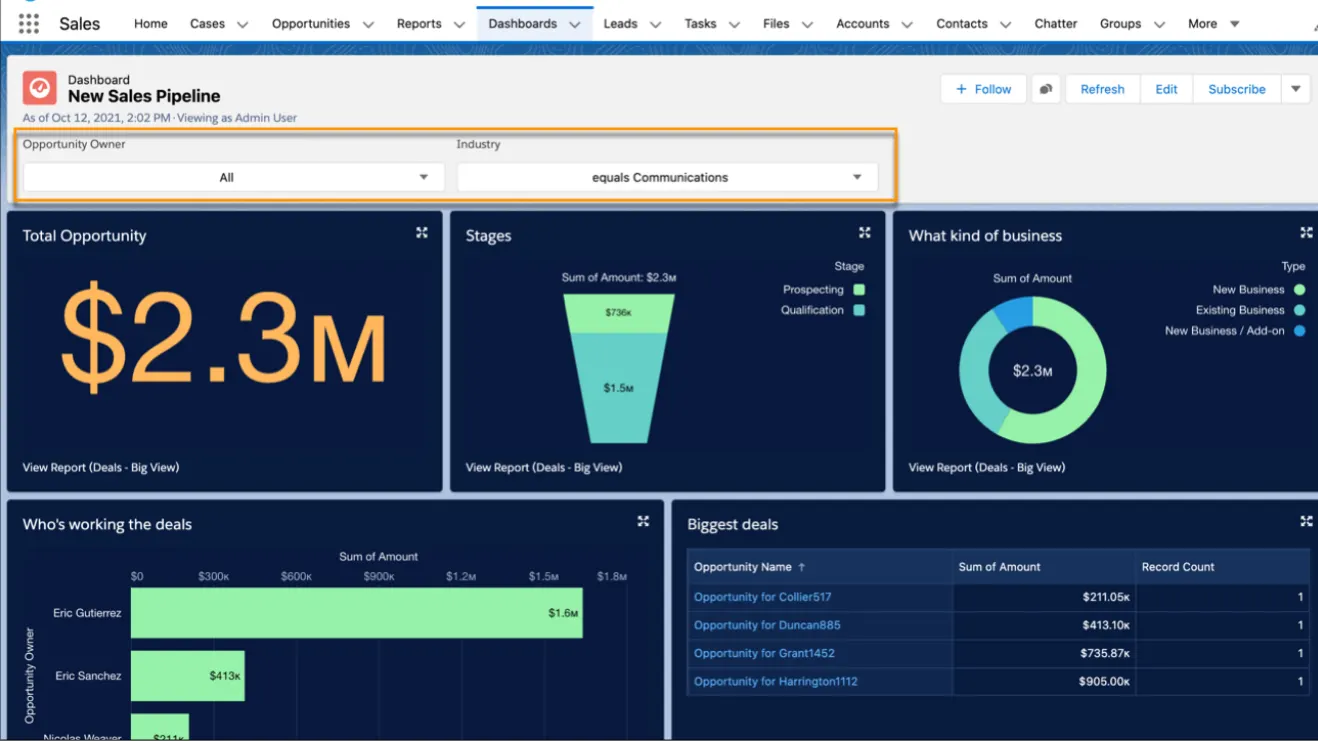
Sales pipeline dashboard for opportunities
For example, the above sales pipeline dashboard displays the data from a single source opportunity report. Applying filters on this single dashboard gives a personalized view for each member of the sales team and gives the Sales manager the visibility of prospects from a specific industry or territory. This one dashboard works for the entire sales organization.
Now that we know what a Sales dashboard is and how to create one in Salesforce, then let us now discuss Dashboard ideas you had never thought of. Even though there are so many ways you can create and use Dashboards in Salesforce, I find the following five ideas mostly I find the following five ideas mostly useful;
1. Dashboards flexibility and users efficiency with Dashboard Pal application
2. Use of Lightning App to embed the Dashboards team's homepage
3. The significance of dashboard subscription and scheduling
4. The power of dynamic dashboards in Salesforce Lightning
5. Best practices to have the dashboard data refreshes faster
The power of dynamic dashboards in Salesforce lightning
Best practices to have the dashboard data refreshes faster.
Dashboards flexibility and users with Dashboard Pal application
This application takes control of dashboard preferences and enables users to access all their dashboards in one interface by selecting a dashboard from a shared folder. Sales or Marketing teams find this very helpful because they can access and view metrics and insights on a single Dashboard Pal without having to navigate or scroll multiple dashboards.
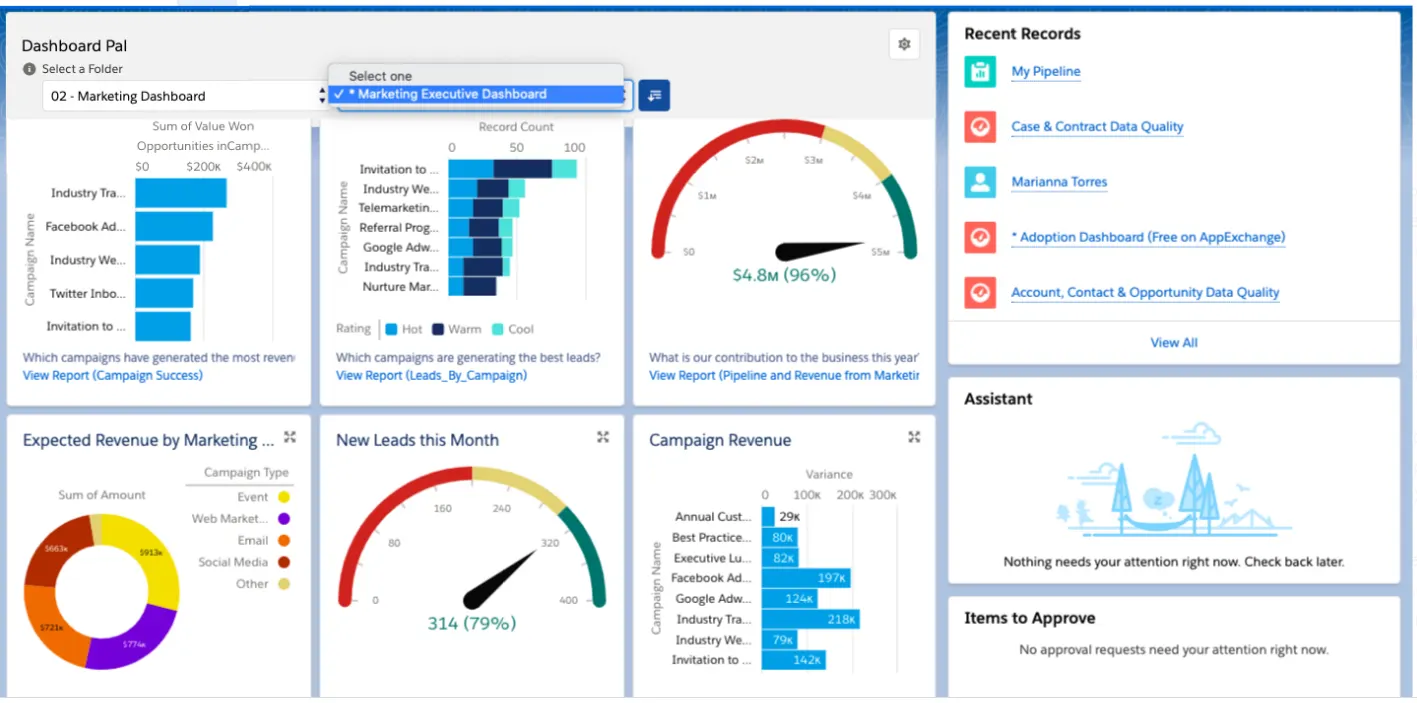
Closing of multiple tasks on a Dashboard Pal
The Dashboard Pal also allows users to work on multiple tasks within the dashboard interface, increasing their working efficiency.
Use of Lightning App to embed the Dashboards team’s homepages
Dashboards are useful if the team accesses them, sees the data and uses it and works on them in the daily to daily operational activities. If the team does not use the dashboard for some reason, there is a way to bring it to them. For example, the Sales Manager cum Salesforce Administrator has access to the Lightning App Builder, which can customize the layout and content pages in the Lightning App.
By adding the Sales Dashboard into the home page of the Salesforce for the whole team or specific members and publishing it, the team will see it and be able to use it as soon as the login.
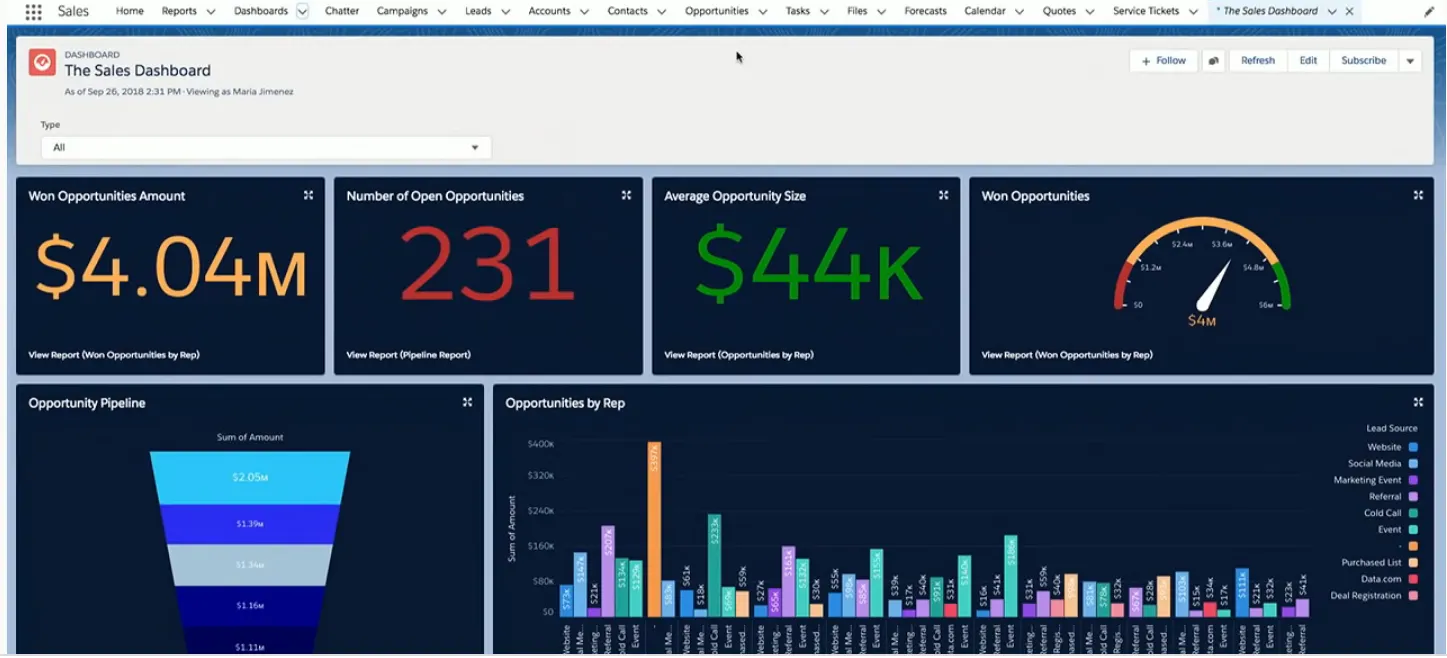
Sales dashboard on Homepage of Salesforce application
If the team is working on another tab such as opportunity or contacts, they might need to refer to a metric in the Sales pipeline. They can go to the main dashboard and click the Sales dashboard, which will appear as its own tab in Salesforce.
The significance of dashboard subscription and scheduling
Dashboards subscription is another cool feature for the Sales team that does not have access to the Salesforce CRM for a reason or two. The "Subscribe and Schedule" feature allows teams to select a dashboard, subscribe and schedule to receive updated Sales performance data daily, weekly, or monthly via email and beautifully displayed on their mobile devices.
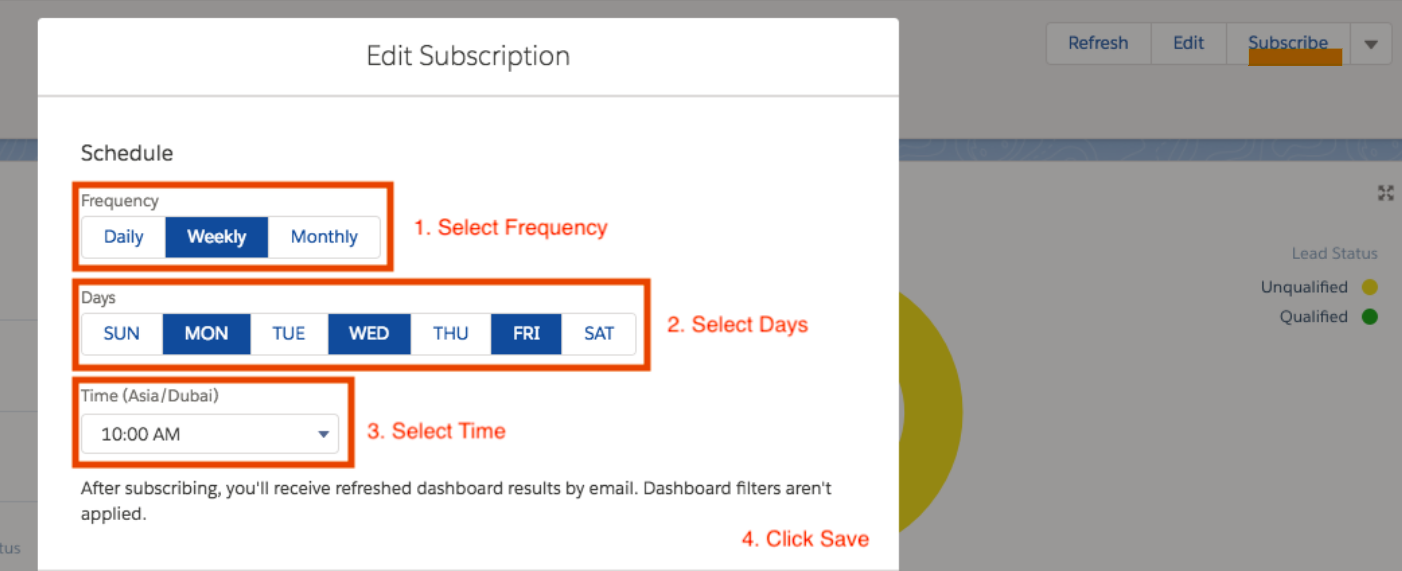
Subscribing and Scheduling a dashboard
The dashboards can help them stay informed with their metrics and insights. Here the Salesforce administrator or Manager will set the schedule for the dashboard to refresh automatically and email data to the team. The team has an understanding of data they need well in advance ahead of scheduled meetings as they come off the field or in those Monday morning meetings after a long weekend.
The power of dynamic dashboards in Salesforce Lightning
A very cool feature for a business scenario is enabling some users to view the dashboard as others. This could be helpful for example, for a Sales VP who wants to see how each dashboard for looks without having to create multiple dashboards and goes beyond dashboards visibility limits.
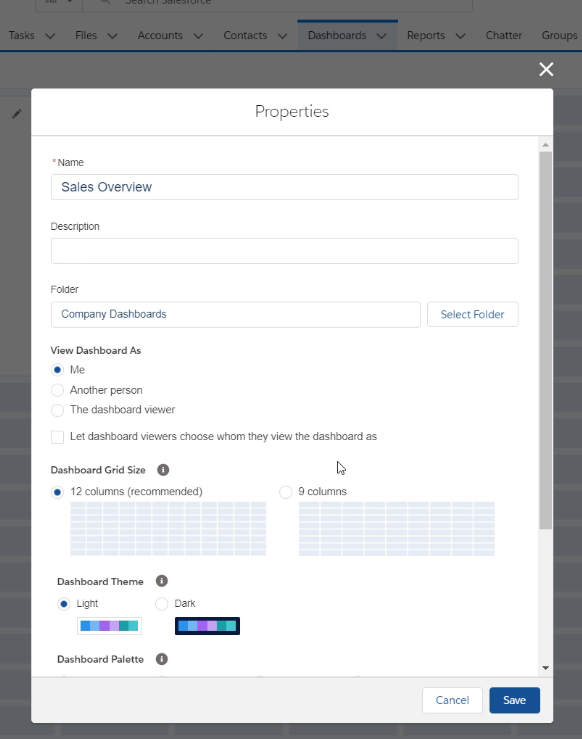
Dynamic dashboard visibility options
Expanding further in this scenario where there is a VP, Sales Manager and 10 Sales Reps who need dashboards access for the sales opportunity pipeline. In this case with the dynamic dashboards feature, only 2 dashboards will serve the purpose instead of 12. This is because all team members only see data that they can access, Sales reps see their own opportunities and deals. Managers see opportunities and close rates for the reps they manage. The VP sees opportunities and close rates for the whole team.
Best practices to have the dashboard data refreshes faster
If a dashboard takes a long time to refresh its data most likely is due to inefficient source reports or because many people are accessing it at once. By optimizing source reports and planning dashboard refreshes, a slow dashboard can run faster.
- The following tips will improve the performance of reports and other components consequently the dashboards
- Use of selective filters such as using “equals” or “not equal” expressions instead of “contains” or “does not contain” in the same way choose 'and' rather than 'or' filters.
- Remove redundant or unnecessary information when building the dashboard
- Try to combine multiple components into one can make the reports load faster hence the dashboard also refreshers more quickly
- Splitting a dashboard in two is another best practice because with fewer components in building it takes less time to run them hence it refreshes faster.
Types of Dashboards in Salesforce
1. Sales Dashboard
This type of dashboard is designed to help sales teams track opportunities, close deals, and improve their performance. Some key elements it may include are:
- Sales Pipeline: A funnel chart showing the status of opportunities in the sales process.
- Goals and Quotas: A comparative metric between sales targets and closed deals.
- Top Customers: A list of the most important clients by revenue generated.
- Opportunities by Representative: An analysis of the individual performance of each salesperson.
2. Customer Service Dashboard
Customer service teams can greatly benefit from a dashboard that helps them monitor ticket volume and efficiency. Some examples of key components include:
- Number of Open and Closed Cases: Metrics on the performance of the support team.
- Average Resolution Time: Helps evaluate the efficiency of service agents.
- Customer Satisfaction: A chart with satisfaction ratings received from surveys.
- Most Common Issues: A breakdown of the main problems reported by customers.
3. Marketing Dashboard
The marketing team needs dashboards that help them measure the effectiveness of their campaigns and optimize their strategies. Some key KPIs include:
- Leads Generated by Channel: Comparison of the performance of different acquisition channels.
- Lead-to-Opportunity Conversion: Conversion rate of prospects into potential customers.
- Campaign ROI: Evaluation of the return on investment of marketing campaigns.
- Social Media Engagement: Monitoring interactions and conversions from social networks.
4. Finance Dashboard
For finance teams, a Salesforce dashboard can provide a clear view of the company's financial health. Some key data points include:
- Total Revenue: A chart showing real-time revenue and its evolution.
- Pending and Paid Invoices: Metrics on accounts receivable and accounts payable.
- Operating Expenses: A visualization of the company's operating costs.
- Profitability by Product or Service: Assessment of the profitability of each business line.
5. Human Resources Dashboard
HR teams can leverage Salesforce dashboards to manage talent and improve employee retention. Some key indicators include:
- Employee Retention Rate: Tracking job stability within the organization.
- Average Hiring Time: A key metric to evaluate the efficiency of talent acquisition.
- Employee Satisfaction: Results from internal surveys about the work environment.
- Absenteeism and Turnover: Data on the level of absenteeism and turnover in the company.
Tips for Creating Effective Dashboards in Salesforce
To make the most of Salesforce dashboards, it is essential to follow some best practices:
- Define Clear Objectives: Before creating a dashboard, identify the key metrics that truly impact the business.
- Keep It Simple and Visual: Avoid overloading the dashboard with too many elements and prioritize intuitive graphics.
- Automate Data Updates: Configure automatic report updates to ensure real-time data.
- Customize for the User: Ensure that each team has access to dashboards relevant to their functions.
- Analyze and Adjust Periodically: Review and update the dashboard based on the changing needs of the business.
Five More Dashboard Ideas for 2025
1. AI-Powered Sales Pipeline Dashboard
Modern sales pipelines leverage AI to predict deal closures and identify potential risks. By integrating AI, dashboards can:
- Highlight opportunities at risk due to inactivity or prolonged stages.
- Suggest next best actions based on historical data and engagement patterns.
- Provide real-time forecasts, adjusting for market trends and sales rep performance.
This proactive approach ensures sales teams focus on high-impact activities, optimizing conversion rates.
2. Interactive Revenue Insights Dashboard
Beyond static revenue reports, interactive dashboards offer:
- Drill-down capabilities to analyze revenue by region, product line, or customer segment.
- Visualizations of recurring revenue streams versus one-time sales.
- Integration with financial systems for real-time revenue recognition and forecasting.
Such dashboards empower finance and sales leaders to make informed decisions swiftly.
3. Dynamic Sales Leaderboard
Fostering healthy competition, dynamic leaderboards:
- Update in real-time, reflecting the latest sales achievements.
- Highlight top performers across various metrics like deal size, speed to close, and customer satisfaction.
- Incorporate gamification elements, awarding badges or points for milestones achieved.
This not only motivates sales reps but also provides managers with insights into team dynamics.
4. Customer Engagement & Health Dashboard
Understanding customer interactions is crucial. This dashboard offers:
- Engagement scores based on email opens, meeting attendance, and support interactions.
- Alerts for accounts showing signs of churn or decreased activity.
- Feedback integration from surveys and NPS scores.
By monitoring these metrics, customer success teams can proactively address issues and enhance satisfaction.
5. Sales & Marketing Alignment Dashboard
Bridging the gap between sales and marketing, this dashboard provides:
- Insights into lead sources and their conversion rates.
- Analysis of marketing campaigns' impact on sales pipeline.
- Feedback loops where sales can rate lead quality, informing marketing strategies.
Such alignment ensures cohesive strategies and maximized ROI on marketing efforts.
Final thoughts
Building a dashboard that tracks key metrics and publishes them in Salesforce to keep the team informed begins with defining the purpose, scope, and need.
Furthermore, the importance of having an insightful dashboard can be deduced from the key questions and corresponding use case answers listed below.
Who is your target audience? Dashboard for the Sales Team
What do they hope to accomplish? Close opportunities as they progress through the Sales pipeline...
I believe the dashboard ideas we discussed in this article will be extremely useful to anyone who uses Salesforce CRM.
The business, on the other hand, will stay informed with real-time insights to make data-driven, informed decisions that will drive performance, work efficiency, and operational excellence.
Dashboards are a tool for providing perspective, highlighting areas for improvement, and exposing flaws. It is up to every member of the team, however, to put it to use effectively.

.webp)
.webp)