
The Complete 2026 Guide to Salesforce CTI: How PhoneIQ Empowers Sales and Service Teams
Unlock efficiency with Salesforce CTI in 2026. This complete guide from PhoneIQ helps businesses enhance communication and streamline operations effectively.

.jpg)
Salesforce CTI (Computer Telephony Integration) links your phone system to Salesforce so reps spend less time toggling apps and more time with customers. This guide covers how CTI works, the tangible benefits, and why PhoneIQ's native integration makes adoption straightforward in 2026. Expect clear definitions, practical CTI adapter advantages, and actionable implementation tips to evaluate and deploy PhoneIQ with confidence.
What is Salesforce CTI and How Does It Improve Telephony Integration?
Salesforce CTI brings telephony features into the Salesforce UI so users can make and receive calls, view customer records, and log activity without leaving the CRM. That tighter workflow cuts manual entry, speeds responses, and gives reps the context they need for more productive conversations.
Understanding Computer Telephony Integration in Salesforce Environments
CTI syncs telephony events with CRM data to enable screen pops, automatic call logging, and click‑to‑dial from records. When a call arrives, the caller's profile and related cases or opportunities can surface instantly so reps answer with full context improving accuracy and reducing handle time.
At its essence, Salesforce CTI bridges traditional phone systems and modern CRM platforms. It lets organizations leverage existing telephony infrastructure while enriching every interaction with CRM context. Within Salesforce, agents can transfer, hold, mute, or conference calls without flipping between devices or apps, creating a smoother, more efficient experience.
How Salesforce CTI Streamlines Call Center Solutions and Sales Communications
Adding CTI to contact centers and sales teams typically lowers wait and wrap‑up times and raises first‑call resolution rates. CTI improves routing, reduces abandoned calls, and increases conversions because agents begin each call with the right information.
CTI also enables smarter routing using CRM signals sending VIPs to senior agents or prioritizing cases by severity. That intelligence boosts customer satisfaction and operational efficiency. And since CTI can tie voice into other channels like chat and email, it supports a unified, omnichannel agent experience.
What Are the Key Benefits of Using a CTI Adapter for Salesforce?
A CTI adapter brings telephony controls, automation, and customer context into Salesforce, so teams move faster and make fewer mistakes. Below are the core benefits most organizations see.
- Increased productivity: By combining telephony and CRM screens, adapters remove app switching. Agents handle calls, view histories, and update records in one place, freeing time for higher‑value tasks.
- Automation of routine work: CTI adapters auto‑log calls, capture timestamps, and create follow‑up tasks. That automation improves data quality and cuts the time agents spend on manual entries.
- Better customer engagement: Instant access to account details and interaction history helps reps personalize conversations and resolve issues faster, building trust and lifting satisfaction.
Beyond those benefits, CTI adapters reduce human error in call logging, help meet compliance needs by documenting calls when required, and scale with your business so you can add users and features without disrupting workflows.
When teams are ready to improve their Salesforce telephony experience, PhoneIQ delivers a full CTI solution that sits natively in the CRM and keeps telephony workflows centralized.
How Does PhoneIQ's Cloud Phone System Integrate Seamlessly with Salesforce?
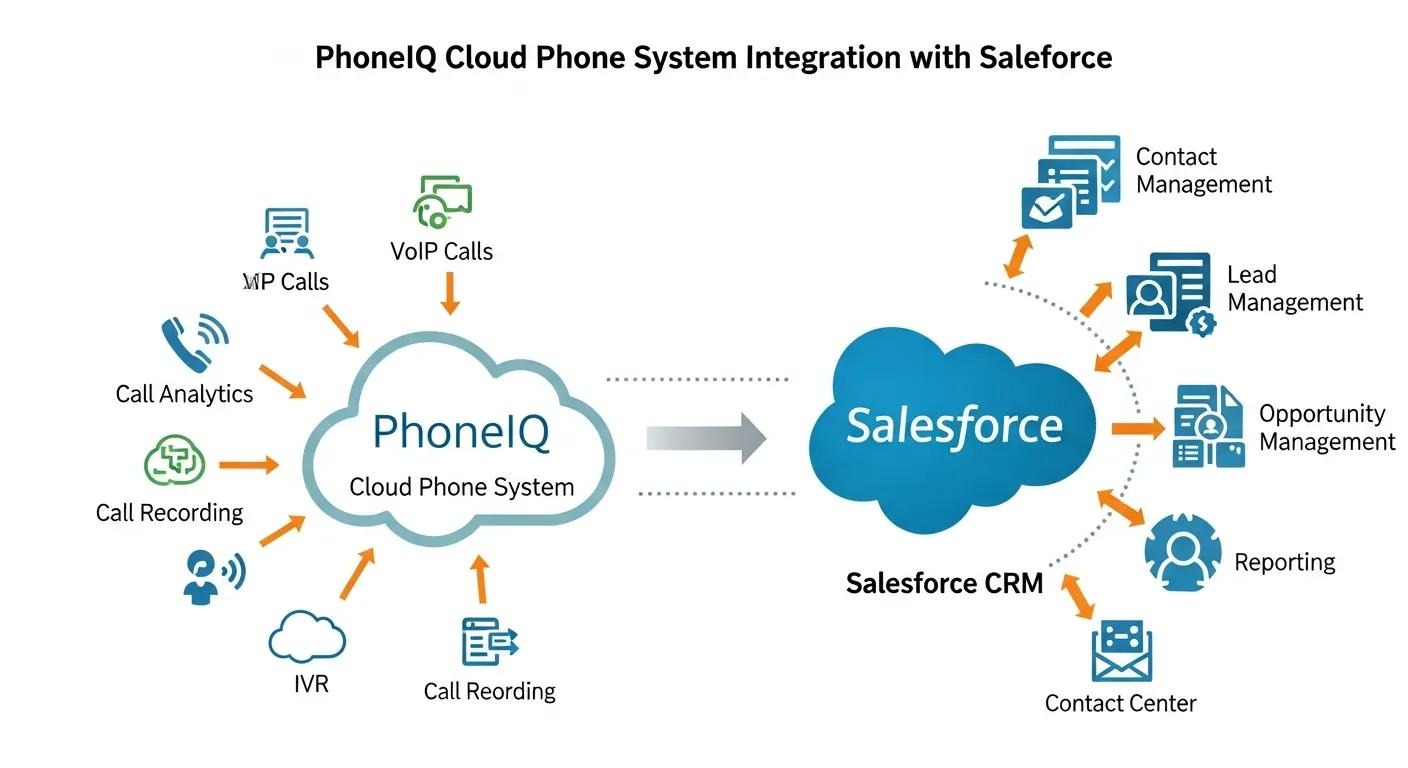
PhoneIQ's cloud phone system integrates natively with Salesforce, removing the need for bulky middleware. That direct connection accelerates deployments, lowers compatibility issues, and delivers a telephony experience that lives inside the CRM where your team already works.
Native Salesforce Integration Without Complex Adapters
Because PhoneIQ connects directly to Salesforce, setup is simpler and doesn't demand heavy technical overhead. Teams get up and running faster, and many customers report immediate productivity gains and fewer support tickets during rollout.
Native integration also means updates and new features roll out without interrupting service, unlike third‑party adapters that can require manual upgrades or introduce compatibility problems after Salesforce releases changes. PhoneIQ's direct approach keeps you aligned with the platform as it evolves.
Real-Time Call Data Synchronization and Click-to-Dial Features
PhoneIQ syncs call activity in real time so every interaction is logged for reporting and coaching. Click‑to‑dial from Salesforce records speeds outbound work and keeps call history accurate, helping managers monitor KPIs and letting agents focus on conversations, not paperwork.
PhoneIQ also supports advanced supervisor tools, call whispering, barge‑in, and call recording controls, directly inside Salesforce. Those features let coaches guide agents live and ensure quality without leaving the CRM.
What Are Best Practices for Implementing Salesforce CTI Solutions in 2026?

Successful CTI rollouts need planning, testing, and continuous optimization. The steps below reflect what most organizations do to ensure a smooth implementation.
- Step‑by‑step PhoneIQ CTI setup for Salesforce: Start with a clear project plan, get PhoneIQ, provision users, and run a pilot with a small group. Validate routing, screen pops, and logging before scaling to the wider team.
- Troubleshoot integrations and plan for scale: Anticipate issues like browser permissions, PBX compatibility, or profile mapping. Document fixes, set a support path, and design the setup to scale with call volume and headcount.
- Review and optimize regularly: After launch, track adoption and KPIs, gather agent feedback, and iterate on routing rules or call flows. Continuous improvement keeps the system aligned with business goals.
Following these steps helps teams maximize CTI ROI and keep communications reliable as needs change.
Include stakeholders from sales, support, and IT early to align expectations and requirements. Provide role‑based training so everyone knows how to use CTI features effectively. Finally, build dashboards and metrics to measure CTI impact and surface opportunities for improvement.
Different CTI adapters offer distinct capabilities, choosing the right one affects automation, reporting, and the agent experience.
See PhoneIQ in Action
To see how PhoneIQ can transform your communications, request a demo and experience the benefits of seamless Salesforce CTI integration firsthand.
Salesforce CTI brings telephony into the Salesforce interface so teams can manage calls, view records, and capture interaction data without switching systems. That consolidated workflow reduces manual entry and speeds response times. For more on our cloud telephony, visit PhoneIQ's cloud phone system page.
Frequently Asked Questions
1. What features should I look for in a CTI solution for Salesforce?
Look for native Salesforce integration, real‑time call sync, and automation features. Core capabilities include click‑to‑dial, automatic call logging, and intelligent routing based on CRM data. Support for omnichannel interactions (voice, chat, email), an intuitive UI, and strong reporting tools are also important. Finally, verify scalability so the solution grows with your business.
2. How does PhoneIQ compare to other CTI solutions?
PhoneIQ stands out for its native Salesforce integration, which simplifies setup and reduces compatibility headaches. It offers real‑time call synchronization and built‑in supervisor tools, like whispering and barge‑in, inside Salesforce. That reduces training needs and keeps updates seamless, making PhoneIQ a dependable choice for teams that want telephony embedded in their CRM.
3. What role does data security play in Salesforce CTI integration?
Data security is essential because CTI touches sensitive customer information. Choose a CTI solution that meets relevant regulations (GDPR, HIPAA where applicable), offers encryption, secure storage, and granular access controls. Regular security audits and timely updates are critical to reduce risk and maintain customer trust.
4. How can I ensure a smooth transition to a CTI system?
Start with a clear project plan and include sales, support, and IT from the outset. Run pilot tests with a small group, deliver role‑based training, and set up a responsive support path for issues. Monitor performance and collect feedback so you can iterate quickly and drive adoption.
5. What are the long-term benefits of using Salesforce CTI?
Over time, CTI delivers improved efficiency, higher customer satisfaction, and better conversion rates. Automated logging and streamlined workflows reduce manual errors and free agents for higher‑value work. Those gains lead to stronger customer loyalty, better brand perception, and measurable revenue impact.
6. Can Salesforce CTI support remote work environments?
Yes. Many CTI solutions, including PhoneIQ, are cloud‑based, so agents can use telephony features from anywhere with an internet connection. Real‑time logging and remote monitoring let managers track performance and support remote agents to maintain service quality.
7. What should I do if I encounter issues during CTI implementation?
If problems arise, consult your vendor's documentation and involve IT to address technical issues like compatibility or network constraints. Maintain a clear support channel for users to report problems, gather agent feedback to find common pain points, and iterate on fixes. Proactive communication and rapid troubleshooting keep deployments on track.
8. What types of businesses can benefit from Salesforce CTI integration?
Any organization with customer‑facing teams benefits from CTI, sales, support, and service groups typically see the fastest returns. Retail, finance, healthcare, telecom, and SaaS companies often use CTI to reduce response times, improve agent throughput, and deliver more personalized service.
Both SMBs and large enterprises can leverage CTI to scale communication workflows; industries with high call volumes or complex interactions see the biggest lift.
9. How does Salesforce CTI impact customer satisfaction?
CTI boosts satisfaction by giving agents immediate access to customer history and context, which reduces resolution times and repeat callbacks. Automated logging and follow‑ups help ensure customers don't fall through the cracks.
By enabling faster, more personalized interactions, CTI strengthens customer relationships and typically raises metrics like CSAT and NPS.
10. What are the costs associated with implementing Salesforce CTI?
Costs depend on company size, telephony complexity, and the CTI product. Budget for software licensing, any hardware, training, and support. While there's an upfront investment, many organizations recoup costs through efficiency gains, higher conversions, and improved retention.
Also consider potential expenses for integration services, customizations, and ongoing maintenance, evaluate total cost of ownership versus expected ROI.
11. Can Salesforce CTI be integrated with other CRM systems?
Yes, many CTI providers support multiple CRMs, but integration depth varies. Confirm compatibility and feature parity before choosing a solution to ensure it delivers the capabilities you need across platforms.
Native integrations usually offer better reliability and performance than third‑party connectors, so weigh that when planning multi‑CRM deployments.
12. What training is required for staff to use Salesforce CTI effectively?
Training should cover core call handling in Salesforce, using click‑to‑dial, interpreting screen pops, and logging exceptions. Hands‑on sessions, quick reference guides, and ongoing coaching speed adoption.
Tailor training by role, agents, supervisors, and admins have different needs, and schedule refresher sessions as features evolve.
13. How can businesses measure the success of their Salesforce CTI implementation?
Track KPIs such as average handle time, first‑call resolution, call abandonment, CSAT, and conversion rates. Monitor user adoption and gather agent feedback to spot friction points.
Dashboards and automated reports provide real‑time visibility, combine quantitative data with qualitative input for a full picture of CTI performance.
14. What are the common challenges faced during Salesforce CTI implementation?
Common challenges include compatibility with legacy phone systems, initial user resistance, and mapping telephony data to CRM fields. Mitigate these with a phased rollout, targeted training, and a responsive support process for early adopters.
Other issues can involve network reliability, security, and data privacy, address these through testing, stakeholder alignment, and clear documentation.
Conclusion
Integrating Salesforce CTI with PhoneIQ gives teams a faster, more consistent way to handle customer calls, boosting productivity, improving data accuracy, and lifting the customer experience. To see these benefits in your workflows, explore PhoneIQ's CTI solutions and request a demo to evaluate fit and impact.
As telephony evolves, choosing a flexible, scalable CTI like PhoneIQ helps your business adapt quickly and stay competitive. Centralizing communication inside Salesforce lets teams focus on what matters most: serving customers and driving growth.

.png)
.png)